
TikTok can now flag AI copies of your face. What creators should do next
Divyansh Verma · Founder · 6 min read · Updated November 25, 2026
If people know your face, someone can now make a video of you saying things you never said, in an afternoon, for free. This week TikTok rolled out two tools aimed at that problem. They help, but they don't stop it. The other half of the answer is on your side: post enough real footage of yourself that your audience knows what you actually sound like.
On this page
What TikTok announced
On 23 November 2026, TikTok said its Likeness Detection tool is rolling out globally, and it opened a public checker for AI-generated images and video. Both were reported by Dataconomy and Net Influencer, linked under the table below.
Likeness Detection is for creators. Eligible creators and public figures, political accounts included, verify their identity through a third-party partner. TikTok then flags videos and accounts that may be using their likeness, and the creator can review the matches and report them to TikTok's safety teams. TikTok says it deletes the ID documents after verification. The tool has been in testing with US creators since July.
The checker is for everyone. It sits in TikTok's Transparency Centre and doesn't need an account: you upload an image or a video, and it looks for C2PA Content Credentials and TikTok's own invisible watermark. TikTok also said it has labelled more than 5 billion AI-generated videos, and that a Manage Topics setting will let people choose how much AI content shows up in their For You feed.
| Likeness Detection | AI content checker | |
|---|---|---|
| Who it's for | Eligible creators and public figures, including political accounts | Anyone, with or without a TikTok account |
| How you use it | Verify your identity with a third-party partner, then review flagged matches | Upload an image or video in TikTok's Transparency Centre |
| What it looks for | Videos and accounts on TikTok that may use your likeness | C2PA Content Credentials and TikTok's invisible watermark |
| What you can do with it | Review matches and report them to TikTok's safety teams | See whether a file carries those signals |
| Main limit | Only eligible accounts can enrol; TikTok hasn't published accuracy figures | Only detects content made or edited with TikTok's own AI tools |
Why it matters, and where it stops
Detection helps after a fake already exists: it can find a copy and help you get it reported. It doesn't stop the copy being made, and it covers less than the headlines suggest. The checker only recognises content made with TikTok's own AI tools. Content Credentials can be lost when a file is downloaded or re-edited, and they only help if the platform reading them looks for them. So a clean result from the checker doesn't prove a video is real.
Your audience is the other detector. A viewer who has watched you for months notices when a voice is a little off, or when "you" suddenly say something you never would. That only works if they've seen plenty of the real thing. A creator who posts once a fortnight leaves gaps for an impersonator to fill. A creator who posts real clips every day doesn't.
Most of that footage already exists. If you make long videos, such as podcasts, streams, interviews or talks, you've already filmed hours of yourself talking. The work is turning those hours into short clips often enough to stay visible. That's what AutoClip is for.
How to turn your own footage into clips with AutoClip
AutoClip takes one long video and gives you a set of short vertical clips cut from it. Everything on screen is footage you filmed: your face, your voice, your words. Here's the workflow.
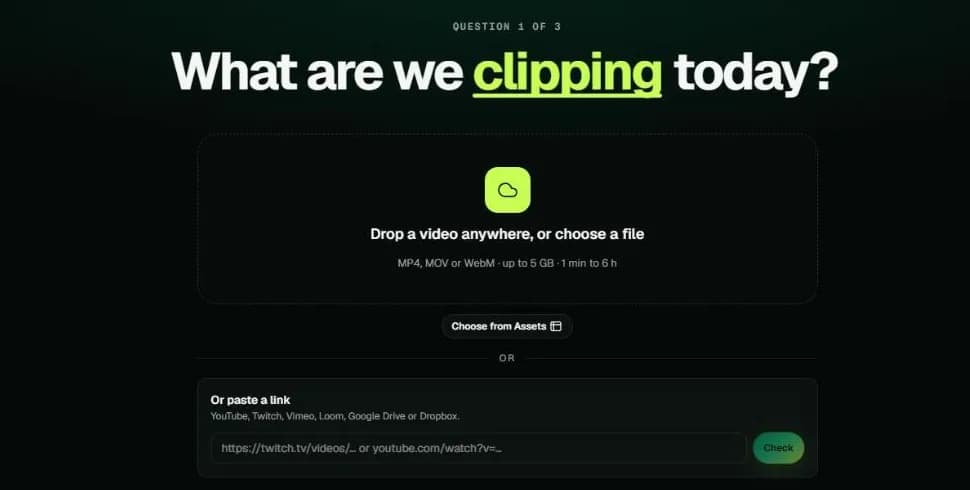
1. Add the long video. Upload an MP4, MOV or WebM file, pick one from your Assets, or paste a link from YouTube, Twitch, Vimeo, Loom, Google Drive or Dropbox. Each plan caps how long a source can be: 30 minutes on Starter, 2 hours on Creator, 4 on Pro and 6 on Agency.
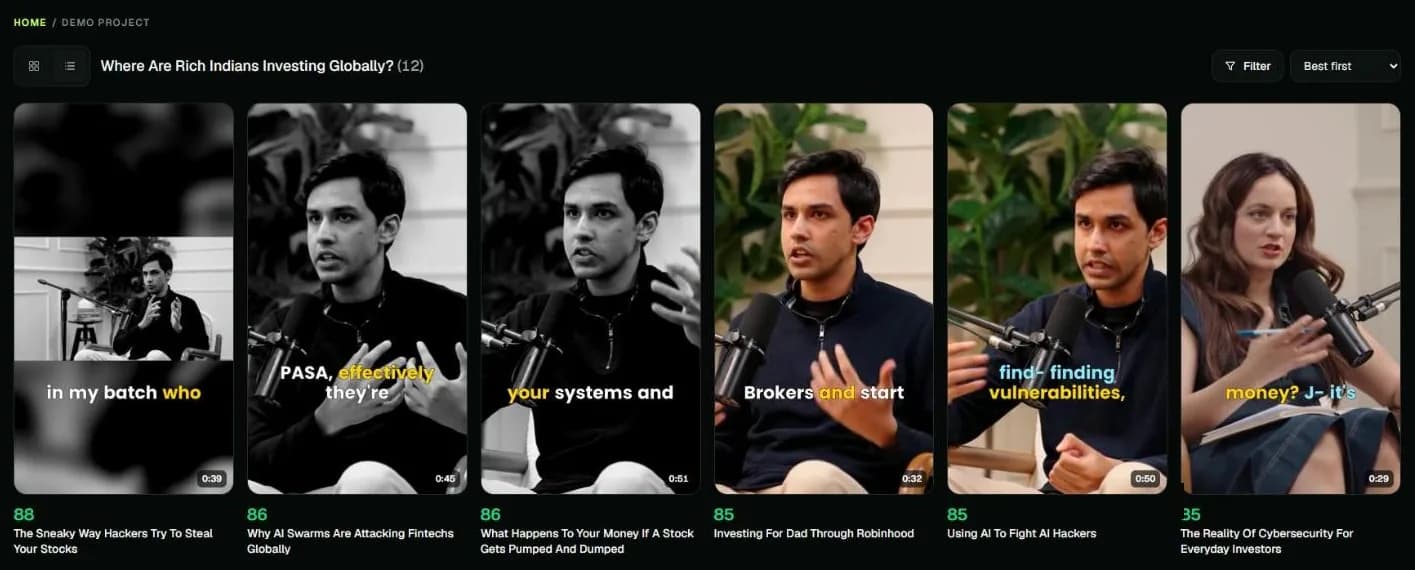
2. Say what you want. Tell AutoClip what kind of video it is and it sets things up for you. You can still choose how many clips you want (up to 20 per run), how long they should be, and the aspect ratio: 9:16 for TikTok, Reels and Shorts. AutoClip transcribes the video, finds the moments that work on their own, reframes them to vertical, and adds captions.
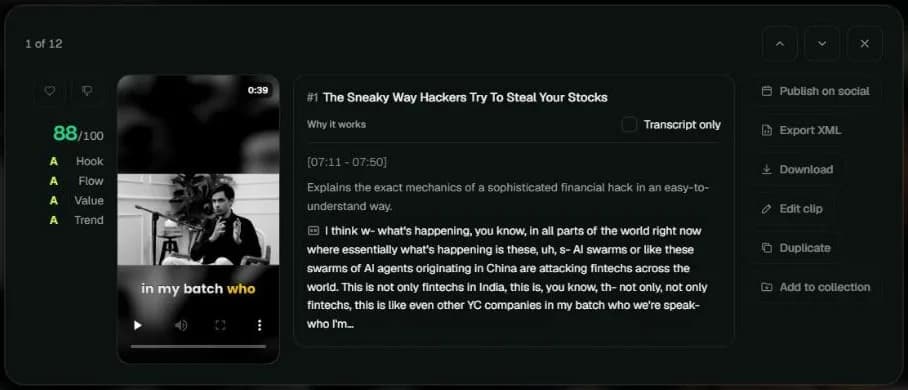
3. Review the clips, best first. Each clip gets a score out of 100, with letter grades for hook, flow, value and trend, plus a short note on why it works and the full transcript. Watch the top few before you post anything. You're the one who knows whether a line lands out of context.
4. Post it. Download the clip and upload it to TikTok yourself; Clipiro doesn't post to TikTok directly. For YouTube Shorts you can publish or schedule straight from the clip once your channel is connected. Instagram and Facebook posts can be planned in Clipiro and posted by you.
Know which parts of a clip are AI
AutoClip can add up to 3 short cutaway images per clip, and those images are AI-generated. They're drawn to illustrate what you're saying, and the prompt rules out human faces and text, so the only person on screen is you. If a platform asks whether a post contains realistic AI-generated visuals, answer honestly and check its current labelling rules.
Three habits that make impersonation harder
Keep your originals. The raw files and links to your full episodes are the simplest proof of what you actually said if you ever need to report a fake.
Post often. One long episode a week can become a clip a day. Our posting cadence guide covers how to space them so they don't compete with each other.
Point back to the full video. A clip that links to the full episode gives viewers a way to check the context for themselves, which is exactly what a fake can't offer.
By the numbers
What it costs: AutoClip uses one Clip Minute per minute of source video, rounded up per video, however many clips it finds. A new account starts with 30 free minutes and gets 15 more each month, with watermarked clips. Re-running the same video within 7 days is free.
Turn your last long video into a week of clips
Paste a link or upload a file. AutoClip finds the moments, reframes them to vertical and captions them.
TikTok's new tools are a real step forward, but they work after the fact and only partly. The best protection you control is a steady stream of real footage of you, so your audience knows the original when they see a fake. If you already have long videos, you already have that footage. Clip it, post it, and keep posting.
Frequently asked questions
It's an opt-in TikTok tool for eligible creators and public figures. You verify your identity through a third-party partner, and TikTok then flags videos and accounts that may be using your likeness, so you can review them and report them to its safety teams. It started testing with US creators in July 2026 and began rolling out globally in November 2026.
No. It looks for C2PA Content Credentials and TikTok's invisible watermark, so it only recognises content made or edited with TikTok's own AI tools. Credentials can be lost when a file is downloaded or edited, so a clean result doesn't prove a video is real.
No. AutoClip cuts clips from the video you upload, so your face and voice come from your own footage. It can add up to 3 short AI-generated cutaway images per clip, drawn without human faces or text.
Not today. Download the clip and upload it in the TikTok app. Clipiro can publish and schedule YouTube Shorts directly, and Instagram and Facebook posts can be planned in Clipiro and posted by you.
Ready to put this into practice?
Start turning your own long-form videos into clips with Clipiro.
Get the creator playbook
Practical short-form video tactics, roughly twice a month. No spam, unsubscribe anytime.